Practical guide
Choosing and operating optical inventory software
Build a catalog that staff can identify consistently
An inventory record is useful when two employees can identify the same physical item from it. Begin with a naming and identifier convention for products and variants. Decide which information distinguishes a model from a particular color or size, and how supplier identifiers relate to the identifiers your practice uses.
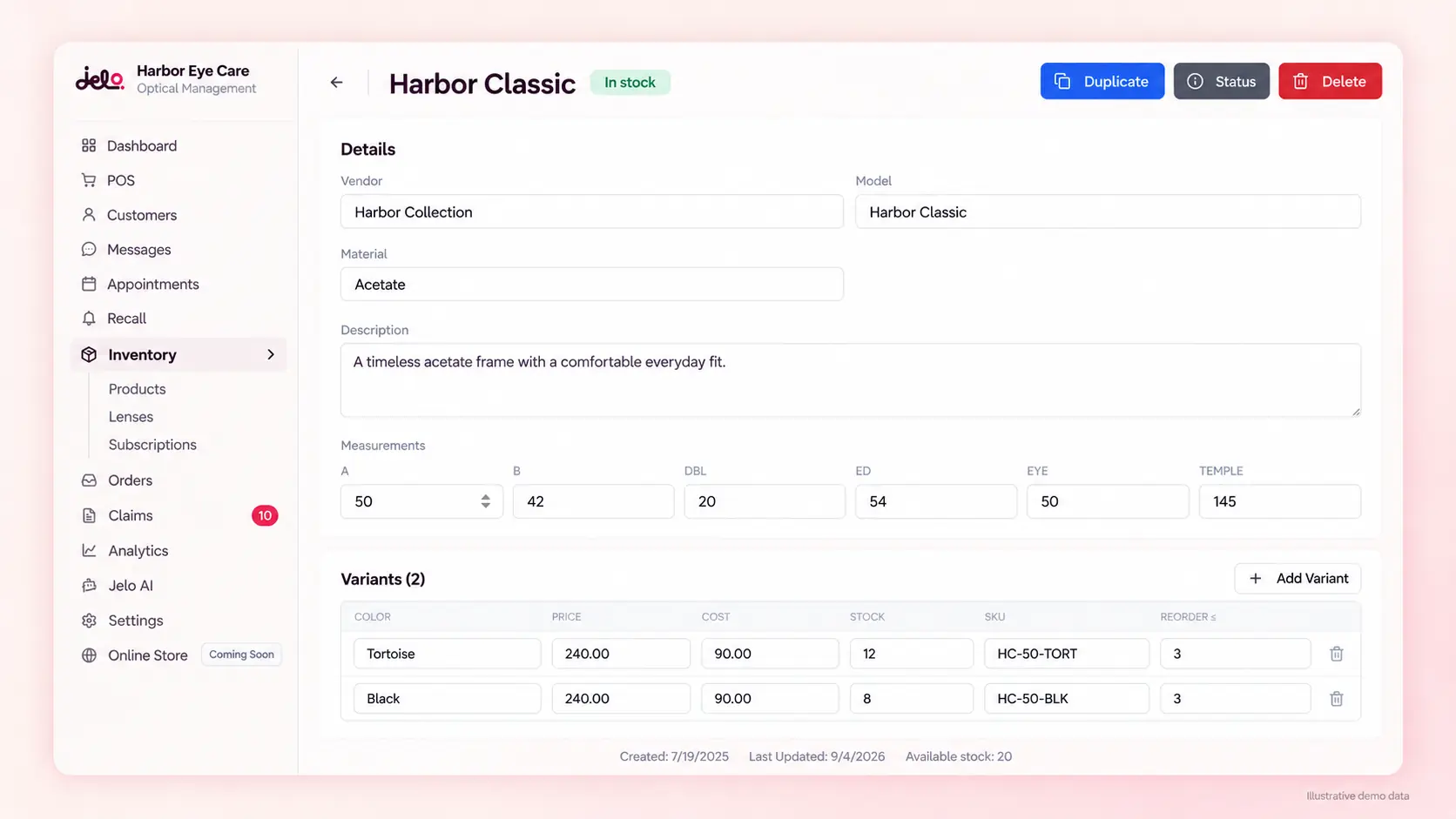
Jelo's frame variant editor includes color, SKU, cost, retail price, stock quantity and reorder threshold. Review those fields with the optical team before importing or entering a large catalog. A consistent structure is easier to maintain than a collection of records created differently by each employee.
Use several similar sample frames during evaluation. Ask staff to find the intended variant without relying on memory of where it sits on the board. If they cannot distinguish the records, improve the catalog definition before treating a stock count or checkout result as dependable. Software can preserve identifiers, but the practice must decide what those identifiers mean.
Separate the product from its quantity at an office
The catalog describes an item; the quantity describes stock in a particular operating context. In a multiple-location practice, the same frame variant may be available at one office and absent from another. A practice-wide product record should not be interpreted as proof of local availability.
Jelo supports office-specific stock and authorized transfers. Train staff to confirm the active office before receiving, adjusting or moving inventory. An all-location view can help with review and reporting, while operational edits should be made in the working office. Confirm the exact permissions during account configuration.
A useful acceptance example starts with the same variant at two offices with different quantities. Ask the employee to identify the local stock and explain the route for obtaining an item from the other office. The demonstration should make source, destination and responsibility clear rather than relying on a general statement that multiple locations are supported.
Establish an opening stock position
Before relying on a new inventory system, define the opening stock you intend to load or record. Identify the offices, item categories and physical areas in scope. Choose a cutoff so the physical count and the recorded quantity refer to the same point in the work.
Separate stock on hand from outstanding purchases, lab work and items that are not available for ordinary sale. The practice should define the treatment of each category rather than combining everything into one quantity. Keep the supporting count or source record available for review.
For an existing practice, reconcile a representative sample before approving the full opening position. Include similar variants and items with recent sales or transfers. Record discrepancies and investigate them before adopting the new count as the baseline. The migration checklist helps coordinate this inventory work with the broader move between systems.
Record receipts against the intended item
Receiving stock should connect the physical delivery with the correct product, variant and office. Check the actual items against the source information and identify any difference before recording the receipt. A supplier's description may not match your internal naming convention exactly, so staff need a dependable way to resolve the identity.
Decide who can create a new catalog record and who reviews a possible duplicate. Creating another variant because the employee cannot find the existing one may split the quantity across records and make later counts confusing. A short review at receipt can prevent repeated corrections during checkout.
Use a fictional delivery with one expected item and one discrepancy in the acceptance test. Ask how staff record what arrived, where the unresolved issue is kept and who follows up. This is an operating procedure to establish with your team, not a claim that every supplier document is automatically imported or reconciled.
Connect stock to the optical sale
When a frame is selected for an order, staff should identify the exact variant and the office supplying it. Jelo connects frame inventory with optical checkout so the sale can be reviewed alongside the relevant item and order activity. Evaluate that connection using the kinds of orders your team actually handles.
Ask the employee to follow one item from the stock record into the order and explain the resulting activity. Include an unavailable item or a quantity discrepancy so the demonstration covers more than a straightforward sale. The next action may require inventory review, a transfer or another practice-approved process.
Keep the stock movement separate from the payment and lab steps. A paid order does not establish that the lab has accepted the work, and a refund does not by itself explain what happened to the physical frame. Review the POS guide for the broader checkout and correction sequence.
Make transfers understandable at both ends
A transfer is a movement between offices, not a second purchase or an unexplained quantity adjustment. The sending and receiving teams need to agree on the item, quantity, source, destination and person responsible for completing the handoff. Confirm how the supported transfer workflow represents those facts.
During a demonstration, ask an authorized employee to prepare a transfer and then review the receiving office's context. Verify the source and destination quantities through the appropriate workflow. If the transfer is interrupted or the physical delivery differs, identify how the practice investigates and resolves the issue.
Avoid using separate manual adjustments as an informal substitute without understanding the consequences. Such a process can make it difficult to explain why stock left one office or appeared in another. Use the multiple-location guide to include transfers in the office rollout and staff training plan.
Count with a cutoff and a defined population
A physical count needs a clear scope. Choose the office, area or item group, and decide how sales, receipts and transfers during the count will be handled. The system quantity and physical quantity should refer to a comparable point in time; otherwise an ordinary movement can look like a discrepancy.
Record the observed quantity separately from any correction. This preserves the evidence needed to investigate the difference. Assign a counter and, where useful, a reviewer for uncertain items. Similar variants should be checked by their identifiers rather than grouped together because they look alike.
The downloadable inventory count sheet includes office, cutoff, item, variant, system quantity, physical quantity, variance, investigation, correction owner and reorder decision. It is an editable worksheet for your process, not a connection to the database. Use the counting playbook for detailed instructions.
Investigate a variance before changing the record
A variance is the physical quantity minus the system quantity under your count definition. If the physical count is three and the system shows five, the variance is negative two. That arithmetic identifies a difference; it does not establish the cause.
Review receipts, sales, returns, transfers and earlier corrections around the cutoff. Check whether the wrong variant was counted or selected in a transaction. A positive variance can be as informative as a negative one, because it may reveal a missed receipt, an incorrect transfer or a duplicate record.
Have the responsible person approve the explanation and any correction according to the practice's process. Preserve enough context for the next reviewer to understand why the quantity changed. Avoid presenting every negative variance as loss or employee error without investigation. The goal is a record the team can explain and a process that reduces recurring mistakes.
Define the treatment of returns and exchanges
A returned frame is a physical item with a condition and an operational decision attached to it. The practice should decide when it can return to available stock, who reviews it and how the relevant order and financial action are handled. A refund alone does not establish that the item is ready for sale.
For an exchange, identify the original variant, the replacement and any difference in quantity or amount. Ask to see the supported workflow and the resulting records. Keep the stock action, financial correction and external lab consequence separate in the evaluation so none is silently assumed complete.
Use your actual practice policy as the requirement. Different policies can produce different acceptance criteria, so a generic demonstration of an edited order may not answer the question. Record what was shown and obtain confirmation of any required return, restocking or refund behavior that remains unclear.
Use reorder thresholds as a review prompt
Jelo's variant configuration includes a reorder threshold. A threshold is useful when staff understand what decision it is intended to prompt. It should be reviewed alongside usable stock, outstanding orders, supplier lead time and the practice's purchasing priorities.
Do not assume that crossing a threshold means an item should be purchased immediately or that the platform automatically places an order. Your practice should define who reviews the need, what information they check and who authorizes the purchase. A low quantity may reflect an intentional change in assortment rather than a problem.
For a fictional example, an item with two units on hand and a threshold of three deserves review, but the decision could differ if four units are already expected or if the practice is discontinuing the variant. Keep the threshold and the purchasing decision related without treating them as the same fact.
Keep lab catalogs separate from physical stock
A lab catalog describes options available through the connected supplier workflow. Physical inventory describes items held at an office. A lens option appearing in a catalog does not mean the practice has that lens physically on hand, and an optical order line is not itself a stock count.
Jelo's VisionWeb workflow uses the location's connected account to discover linked lab accounts and available catalog options. The practice needs to confirm its specific account, supplier and configuration. A familiar lab name does not establish that the connection is ready to submit the intended order.
Review the selected supplier, prescription, frame, measurements and shipping details before submission. Then inspect the response separately from the retail order status. The VisionWeb guide explains prerequisites and exception review without assuming universal lab coverage or identical status information from every supplier.
Choose useful inventory measurements
Inventory measurements should answer a defined operating question. You might track the number of discrepancies investigated, the number of records requiring duplicate cleanup or the completion of a scheduled count. Each measure needs a population, a period and an observable completion rule.
A reconciliation completion rate is different from stock accuracy. If 15 of 20 discrepancies receive the agreed investigation, the completion rate is 75%. That does not mean 75% of every frame in the practice was correctly recorded. Keep the measure's name aligned with what was actually counted.
Use the practice operations worksheet for aggregate completion counts where appropriate. It does not calculate inventory valuation or prove that software caused an improvement. Review the underlying exceptions and choose an operating change before interpreting a percentage as a result.
Plan permissions and coverage
Identify who can create products, edit variant information, receive stock, transfer items and approve corrections. Test the relevant staff role rather than relying only on an administrator's demonstration. A person covering another office may need a different scope than an employee who works at one location.
Prepare a short handoff for unresolved inventory work. It should identify the item, office, issue, source reference and next owner. This helps the practice continue when the usual optical manager is absent and reduces dependence on private notes or memory.
Review permissions when responsibilities change. Keep the operating procedure consistent with the current account configuration, and confirm that staff know when to stop and request an authorized action. Clear access and responsibility make inventory changes easier to understand during a later count or financial review.
Evaluate the whole inventory cycle
A complete acceptance test should include creating or finding a variant, recording an opening quantity, following a sale, investigating a discrepancy and reviewing a reorder decision. Add a transfer if the practice operates multiple locations. Each task should produce evidence the responsible employee can explain.
Jelo's inventory workflow is part of the platform subscription, priced at $300 per month per location or $3,000 per year per location paid upfront, with unlimited doctors and staff at each paid location. Review hardware, external services and applicable charges separately. Use the same scope when comparing another vendor's proposal.
Bring your item structure and requirements to a demo with Joel or Loreli. Use the software evaluation sheet to record demonstrated work, required setup and unanswered questions. The goal is an inventory process that fits the practice from receiving through checkout and reconciliation.
Clean up duplicate identifiers before a larger count
If two records appear to describe the same frame variant, assign a reviewer before combining or changing anything. Compare the identifiers and the associated activity in the approved workflow. A similar name is a reason to investigate, not proof that the records represent one item.
Document the resolution and explain which record staff should use afterward. Include the people who receive stock and those who sell it, because either group can recreate the confusion if the naming rule remains unclear. Resolving a small catalog issue before a full count can make the later variance review easier to interpret.