Practical guide
Understanding payments, costs and reconciliation
Follow the money through three different records
A payment workflow becomes easier to understand when staff distinguish the patient’s order, the processor transaction and the bank payout. The order shows what the patient owes for the selected products or services. The processor transaction shows whether an integrated payment was successfully handled. The payout shows money moving from the processor toward the practice’s bank account. These records are related, but they answer different questions and may be updated at different times.
Jelo’s optical payment workflow tracks payments and remaining amounts against an order. It distinguishes integrated payment links from supported manual methods such as cash and external-card records. A staff member recording that a patient paid through another terminal is documenting an event handled elsewhere; that record does not charge the card through Jelo. The practice needs to verify the actual external transaction and reconcile the two records.
Start training by asking staff to identify which question they are answering. “Does the patient still owe money?” is different from “Did the card charge succeed?” and different again from “Has the money reached our bank?” A clear answer names the relevant record and status. This reduces the risk of treating an unfinished payment link, an order marked paid or a processor payout as interchangeable evidence.
Understand Jelo’s confirmed processing rate
Jelo uses Stripe as its payment processor. Jelo’s processing rate is 3.5% plus $1.30 per transaction, separate from the platform subscription. The percentage applies to the transaction amount, and the fixed amount is added for that transaction. This is Jelo’s stated rate for its offering; it should not be described as Stripe’s universal published price for every business or payment arrangement.
The fee can be written as transaction amount multiplied by 0.035, plus $1.30. For a $100 transaction, the percentage portion is $3.50 and the total processing fee is $4.80. For a $250 transaction, the percentage portion is $8.75 and the total is $10.05. For a $500 transaction, the percentage portion is $17.50 and the total is $18.80. These examples are arithmetic illustrations, not actual patient transactions.
A processing-rate example does not establish payout timing, hardware compatibility, refund charges, dispute handling or the treatment of other fees. Review those terms for your account before relying on them in a patient conversation or financial forecast. The pricing page and terms identify the confirmed commercial information and the existing non-integrated processing provision that should also be reviewed with the team.
Calculate transaction volume and count separately
The fixed part of a per-transaction fee makes the number of transactions relevant as well as the total processed amount. For a fictional month with $10,000 processed in one hundred transactions, the percentage portion is $350 and the fixed portion is $130, giving $480 in fees at the stated rate. If the same total is processed in two hundred transactions, the percentage portion stays $350 while the fixed portion becomes $260, giving $610.
These examples show the arithmetic, not a recommendation to change patient payment arrangements. The practice’s collection policy should consider the patient experience, its agreements and its operational needs. Do not combine unrelated payments or change an agreed installment arrangement simply to imitate a fee example. The useful budgeting lesson is to collect both expected volume and expected transaction count when estimating processing costs.
Keep the estimate separate from actual reconciliation. A budget uses assumptions about future activity; the processor’s records show what actually occurred. If actual fees differ from the estimate, review the volume, count and transaction details before assuming the quoted rate is wrong. Also check whether the comparison includes adjustments or other charges outside the simple example. A written explanation of the difference is more useful than a total without its components.
Prepare the payment account before collecting real money
Account readiness is an implementation dependency. Complete the integrated payment onboarding and confirm that the account is ready for the collection methods your practice intends to use. Staff should know which account and location they are working with and who can resolve an onboarding or payment-readiness question. A visible payment button alone is not evidence that every account prerequisite has been completed.
During setup, review the workflow with sample information and the implementation team’s approved testing process. A public software demonstration should not require charging a real patient card. Ask to see how a payment link is prepared, how its amount relates to the order and how the final status is inspected. Record any settings or outside steps that must be completed before staff can use that process for actual collections.
Assign responsibility for maintaining the payment setup. Changes to a practice’s banking or account arrangements should follow the authorized process rather than an informal workaround at the front desk. This guide does not specify a particular payout schedule, terminal model or account architecture because those details have not been confirmed for every Jelo practice. Bring those requirements to the implementation review and document the answers for your configuration.
Review an integrated payment link from creation to completion
An integrated payment link represents a request to collect an amount associated with an order. Staff should review the amount and the intended patient context before using it. In Jelo’s workflow, a pending active link reserves its amount against the order’s available balance. That reservation helps distinguish work already in progress, but it is not a completed payment and should not be described to the patient as money received.
Use a fictional order to follow the statuses. Ask the presenter to show the pending link, the order’s remaining amount and the evidence used to confirm completion. Also ask how staff recognize an unsuccessful or otherwise unresolved result in the supported workflow. The important operating habit is to inspect the final status before recording a separate collection or telling another staff member that the payment is settled.
If a patient calls while the result is unclear, identify the existing payment attempt before creating another one. Your team should know who investigates and which records to compare. Do not assume that clicking again is a harmless way to resolve uncertainty. The exact handling of an unresolved payment depends on the supported action and processor response, so the practice should review that procedure during onboarding.
Record cash and external-terminal payments accurately
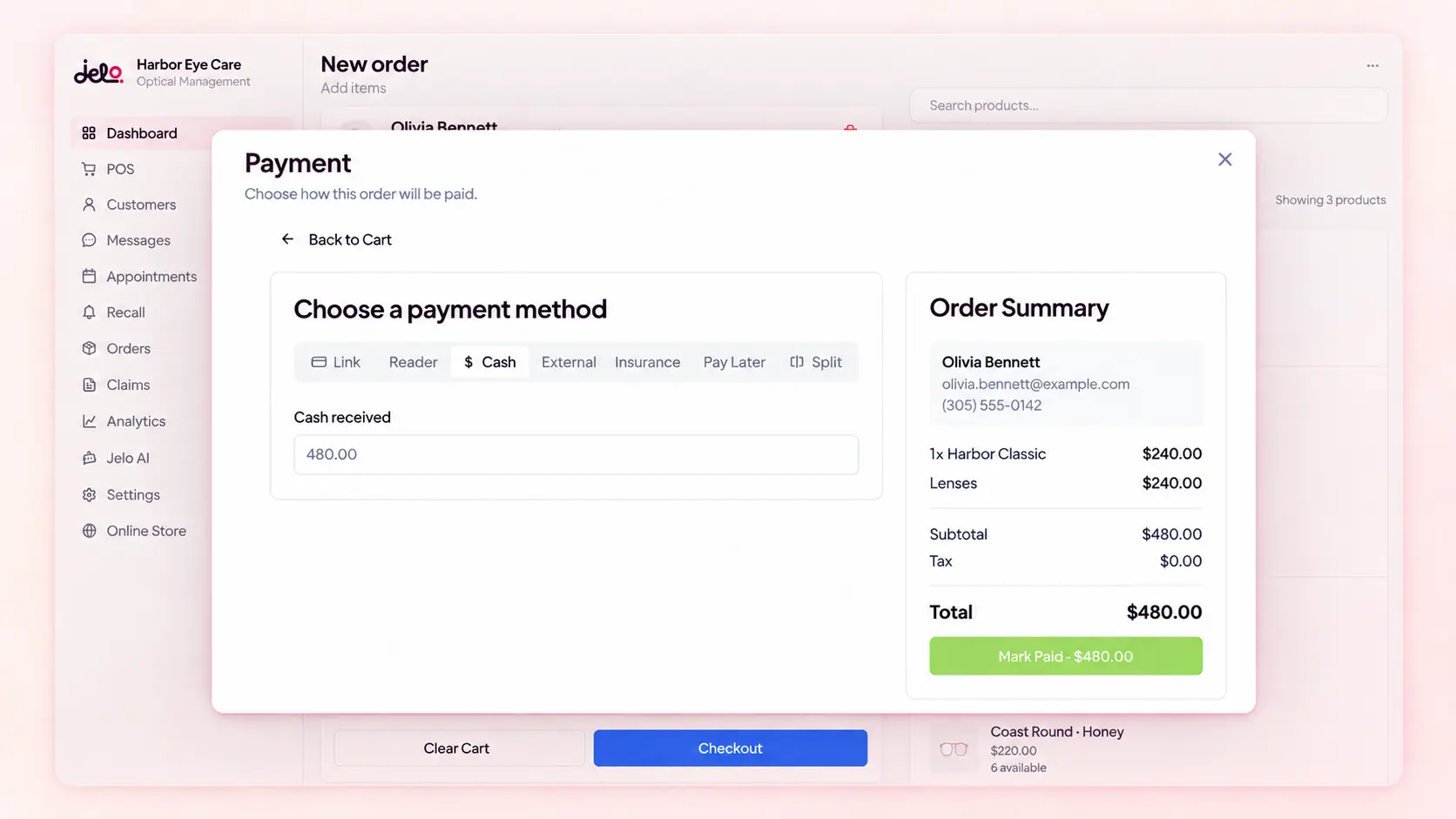
Manual payment records document money collected through a supported method outside the integrated link flow. A cash record should correspond to cash actually received under the practice’s procedure. An external-card record should correspond to a transaction verified in the external terminal or processor. In both cases, the staff entry describes the event; it does not independently prove that the money was received.
For a fictional example, a patient pays $80 using a separate terminal. The employee verifies the successful transaction there, then records the appropriate amount and method against the correct Jelo order. If the terminal transaction failed, recording an $80 external-card payment in Jelo would create a misleading order balance. The practice needs a procedure that keeps the external evidence and the internal record aligned.
Decide what reference your team needs to find the corresponding external transaction later. Keep sensitive payment information in the appropriate payment system and follow your approved handling process. This guide does not recommend copying card details into notes or a spreadsheet. The useful reference is enough to support reconciliation without turning an operational note into an unnecessary store of payment credentials.
Work with partial and split payments
A patient may have an order with more than one payment entry. To understand the balance, staff need to review each completed amount and any pending collection separately. A single label such as “paid something” is not enough to explain what remains. The Jelo workflow shows payment entries and remaining amounts; the practice should train staff to read those entries before requesting another payment.
Consider a fictional $300 order with a completed $100 cash payment and a pending $200 integrated link. The completed cash payment and the pending link represent different states. Staff should not treat the pending $200 as deposited money, and they should review the active collection before asking for an additional payment. The example illustrates how to reason about status; it is not a claim that every possible split-payment arrangement has the same supported controls.
When reviewing a split payment, verify the order, amounts, methods and final statuses. If a correction is needed, identify which original entry is affected. A correction to an internal record and a refund through a processor are separate actions unless the supported workflow explicitly connects them. Demonstrate the exact correction your practice expects to perform so staff do not learn that distinction only after a real mistake.
Handle refunds, voids and record corrections as different questions
A refund returns money through an appropriate financial process. A void or cancellation may affect an unfinished transaction, depending on its stage and the supported payment method. Editing a record can change the information shown in the practice system. These terms should not be used interchangeably. Before acting, staff need to identify what happened originally and what outcome is actually required.
For an external-terminal payment, changing a record in Jelo does not itself move money at the external processor. The responsible employee must follow the supported process in the system that handled the money and reconcile the resulting record. For an integrated payment, demonstrate the supported action and its relationship to the original transaction. Do not assume a refund policy, fee treatment or processing time that has not been confirmed in the account’s terms.
Create a short approval and documentation procedure appropriate to your practice. Identify who may initiate a correction, who checks the amount and how the outcome is recorded. Use fictional examples during training, including a case where the wrong record is about to be selected. The goal is a deliberate decision tied to the original transaction, not simply a button that makes an order balance look convenient.
Reconcile the processor and the bank
Reconciliation connects the practice’s records with the processor’s activity and the bank statement. Stripe’s documentation explains that a payout can include activity from multiple transactions, and that its records can distinguish payments, refunds, fees and payouts. Therefore, a single bank deposit should not automatically be matched to one patient order. The relevant task is to identify the activity included in the payout and explain the resulting amount.
Begin with the processor record for the payout you are investigating. Compare the included transaction activity with the practice’s payment records, then compare the payout result with the bank statement. Keep timing differences visible rather than forcing every record into the same date. A payment completed on one date and a later payout can both be correct. The account’s actual payout settings determine the expected process.
If a difference remains, write down what has and has not been matched. A useful note identifies the payout or transaction reference, the amount being investigated and the responsible person. Avoid an unsupported conclusion such as “the software lost the payment” before the records have been compared. Stripe’s payout reconciliation documentation provides the processor-side reference; Jelo’s order record provides the practice-side context.
Separate insurance reimbursement from patient processing
Jelo’s insurance and payer services are handled by Taiga, with a fee of 10% of insurance reimbursement for the AI biller service. This is separate from the 3.5% plus $1.30 payment-processing rate and separate from the platform subscription. A useful financial discussion names which service a fee belongs to rather than describing everything as a single “billing charge.”
For a fictional $1,000 of insurance reimbursement, 10% is $100. That arithmetic example does not establish how every adjustment, reversal or account-specific billing situation is treated. Review the applicable service scope and agreement for those details. Similarly, do not automatically apply the patient-processing fee to an insurance amount without understanding how the money actually moves in the practice’s configured workflow.
The AI biller is available in beta without usage caps during beta, and future caps are planned. The lack of a usage cap does not waive the reimbursement-based fee. When comparing vendors, record the platform subscription, patient processing and insurance services on separate lines. This produces a clearer comparison than combining a flat software price from one vendor with a service-inclusive quote from another.
Build a daily review that staff can complete
A payment review should answer a few practical questions: which collections completed, which remain pending, which records need reconciliation and which exceptions have an owner. The practice chooses the review interval and responsible roles. This guide does not prescribe a universal closeout time or claim that Jelo automatically performs every step of the review. Use the actual supported records and a process your staff can repeat.
Start with unresolved items that could lead to duplicate collection or an incorrect patient balance. Review pending links, unclear external-terminal results and corrections awaiting confirmation. Then reconcile the completed activity according to your practice’s procedure. Keep an exception list in the approved workspace with a next action and review date. An unresolved difference is easier to manage when it remains visible and specific.
At a later review, examine recurring causes rather than only the number of exceptions. A pattern may reflect unclear training, a confusing payment method label, a missing account prerequisite or a process that needs a second check. Choose an improvement based on the evidence. Do not turn a short observation period into an unsupported claim of reduced errors or increased revenue.
Review permissions and location context
Payment work involves both access and responsibility. Identify who can view order balances, record payments, manage the relevant settings and carry out supported corrections. In a multi-location practice, also identify the office context for the task. Jelo’s roles and office access help represent these distinctions, but the practice must decide which responsibilities each staff member should hold.
Use role-specific demonstrations. Have the person who will normally collect a payment perform the fictional workflow using the intended permissions. Then ask the person who reviews finances to find the information needed for reconciliation. An owner account may make every screen easy to reach while hiding an access problem that an employee will encounter later. Testing the actual roles gives a more useful picture of readiness.
For multiple locations, confirm how the payment arrangement and reports represent each office. Do not assume that every processor account or payout is automatically separated in the same way as the practice’s offices. Bring the intended operating structure to the setup review. A clear location definition in both the practice record and the financial review prevents misleading comparisons between offices.
Questions to bring to the payment demonstration
Bring the payment methods your practice intends to accept, a fictional order amount and the corrections staff expect to handle. Ask Joel or Loreli to walk through the order, the collection status and the evidence used for reconciliation. Include an integrated link and an external-terminal example so the team can see which actions collect money and which actions only record an event handled elsewhere.
Ask about account readiness, supported hardware, payout settings, refund and dispute terms, and the existing non-integrated processing provision. These details should be answered for the practice’s actual arrangement. The confirmed rate is useful, but it does not answer every commercial or operational question. Keep unanswered items on the implementation checklist rather than supplying assumptions to patients or staff.
Finish by asking each responsible person to explain a completed payment, a pending payment and a bank payout in their own words. Then review a split-payment example and one correction. If the team can identify the correct record, explain the balance and name the next action for an exception, the demonstration has produced useful operating knowledge. That is a stronger readiness signal than a screenshot showing a payment button.