Practical guide
Designing a dependable intake workflow
Understand what digital intake is meant to improve
Digital intake should help a practice collect information that its team can find, review and use in the next step of a visit. Replacing a paper form with an online form is only part of that job. The operating question is what happens after the patient submits the information: who checks it, how missing details are handled and how the clinician distinguishes patient-entered information from the reviewed clinical record.
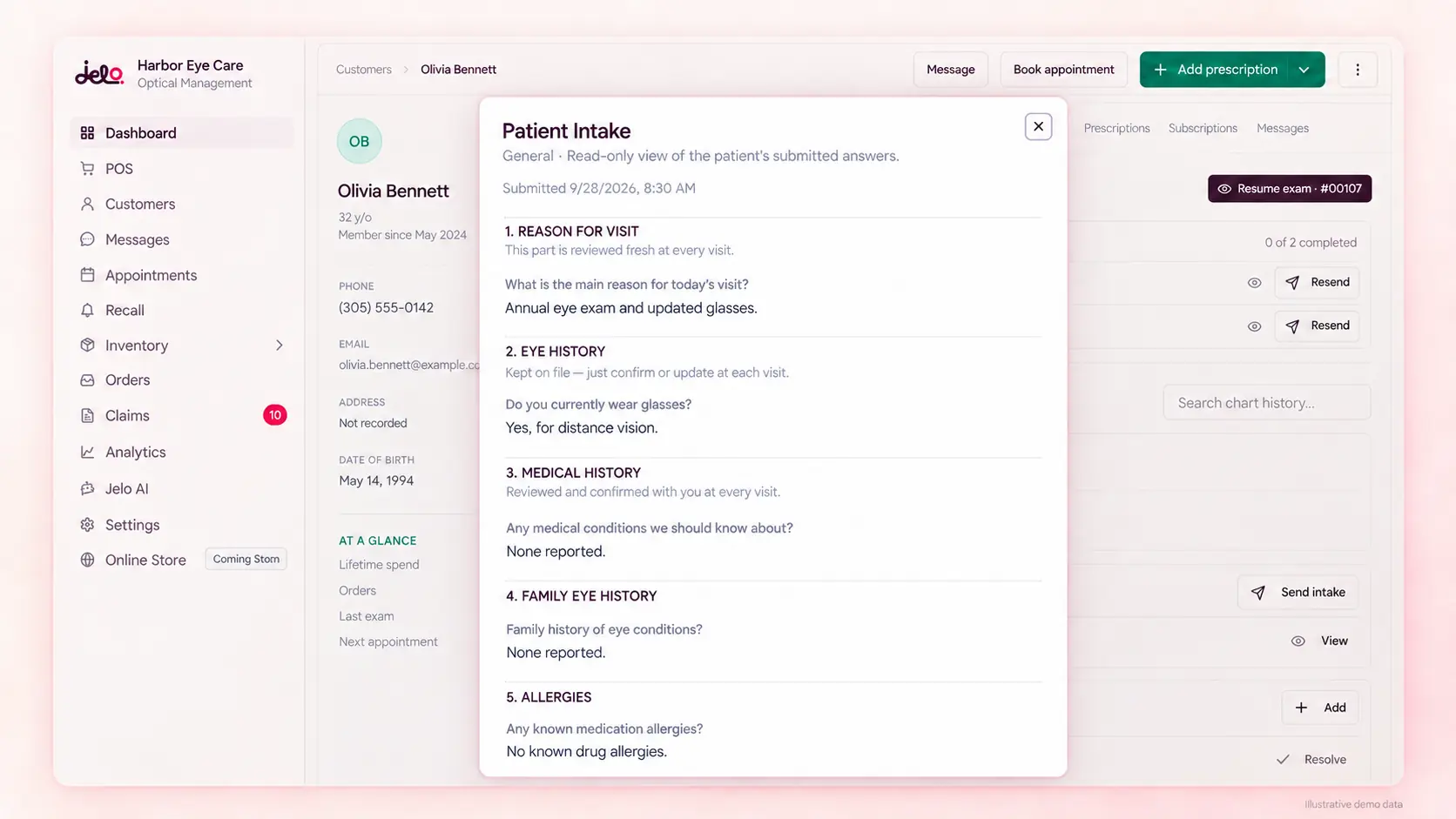
Jelo supports patient intake within its connected practice workflow. Its general-intake builder lets authorized staff configure supported questions, including visibility, order and required answers, and add supported custom fields. Other intake types serve different visit contexts. The ability to configure general intake should not be read as a promise that every field in every specialty form has the same customization options.
Start your evaluation with an ordinary new patient and an ordinary returning patient. Write down the information your front desk needs, the information that requires clinical review and the acknowledgments or consent records your practice tracks. For each item, identify the person responsible for the next step. This makes the form part of a workflow instead of a separate collection of answers that someone must search for later.
Map the information to a responsible reviewer
Different answers require different kinds of review. Contact details may need front-desk verification, while medications, allergies and other clinical history require review by the appropriate clinical team. A patient’s selection on a form should not automatically be treated as reconciled clinical information. Make the handoff explicit so staff understand which questions they can resolve and which questions must reach a clinician.
For a fictional example, a patient submits an intake and leaves part of the history unclear. The front desk can confirm that the form was received and identify the missing section, but the clinical interpretation belongs with the clinical team. Your procedure should make that distinction easy to follow. It should also give the patient a way to ask for help without requiring them to guess which answer will allow the form to proceed.
Create a simple review map alongside the form configuration. For each group of questions, record the reviewer, the point in the visit when review happens and the place where unresolved work is tracked. This is an operating aid recommended by this guide, not a claim that Jelo automatically assigns every answer to a staff queue. During the demo, ask to see the actual supported review workflow and document any manual handoff.
Decide which questions belong on the general form
A useful form collects information the practice has a reason to use. Review each question with the people who work with the answers. Ask whether it is needed before the visit, whether the wording is understandable and whether it belongs on every patient’s general intake. Questions that are irrelevant to a patient can create confusion, while an unclear required question can make someone supply an unreliable answer just to continue.
In Jelo’s general-intake builder, authorized staff can configure supported questions within the available constraints. Use those controls to make the form fit the practice’s process. Keep field meaning clear when changing a label or order. If two staff members interpret the same question differently, moving it to a more convenient place will not solve the underlying problem. Agree on the intended meaning before changing the form.
Test the configured form with a fictional person who has never seen your internal terminology. Ask that person to explain what each question is asking, rather than merely complete the fields. This can reveal ambiguous labels and instructions that are obvious to staff but unfamiliar to patients. Record the issue and review the proposed correction before publishing a change that will affect subsequent intake use.
Use required answers deliberately
A required field can help prevent an incomplete submission, but it does not guarantee an accurate or useful answer. Decide why a question is required and what staff will do if the patient cannot answer it. A practice should have a way to assist someone who needs help rather than treating every missing response as a patient error. The software configuration and the human support process should be reviewed together.
Try several sample completions: all expected answers supplied, an optional field blank and an answer that requires clarification. Confirm which fields are actually required in the configured form and whether the instructions make sense on a phone. Avoid assuming that a field’s appearance alone establishes its validation behavior. The meaningful evidence is the observed result when the sample form is completed.
Keep the scope of required answers under review as the practice learns from use. If a question repeatedly generates confusion, investigate the wording, timing and relevance before simply adding more instructions. A longer form is not automatically a better form. The useful outcome is a record the team can review without unnecessary repetition or avoidable ambiguity.
Distinguish intake types and visit context
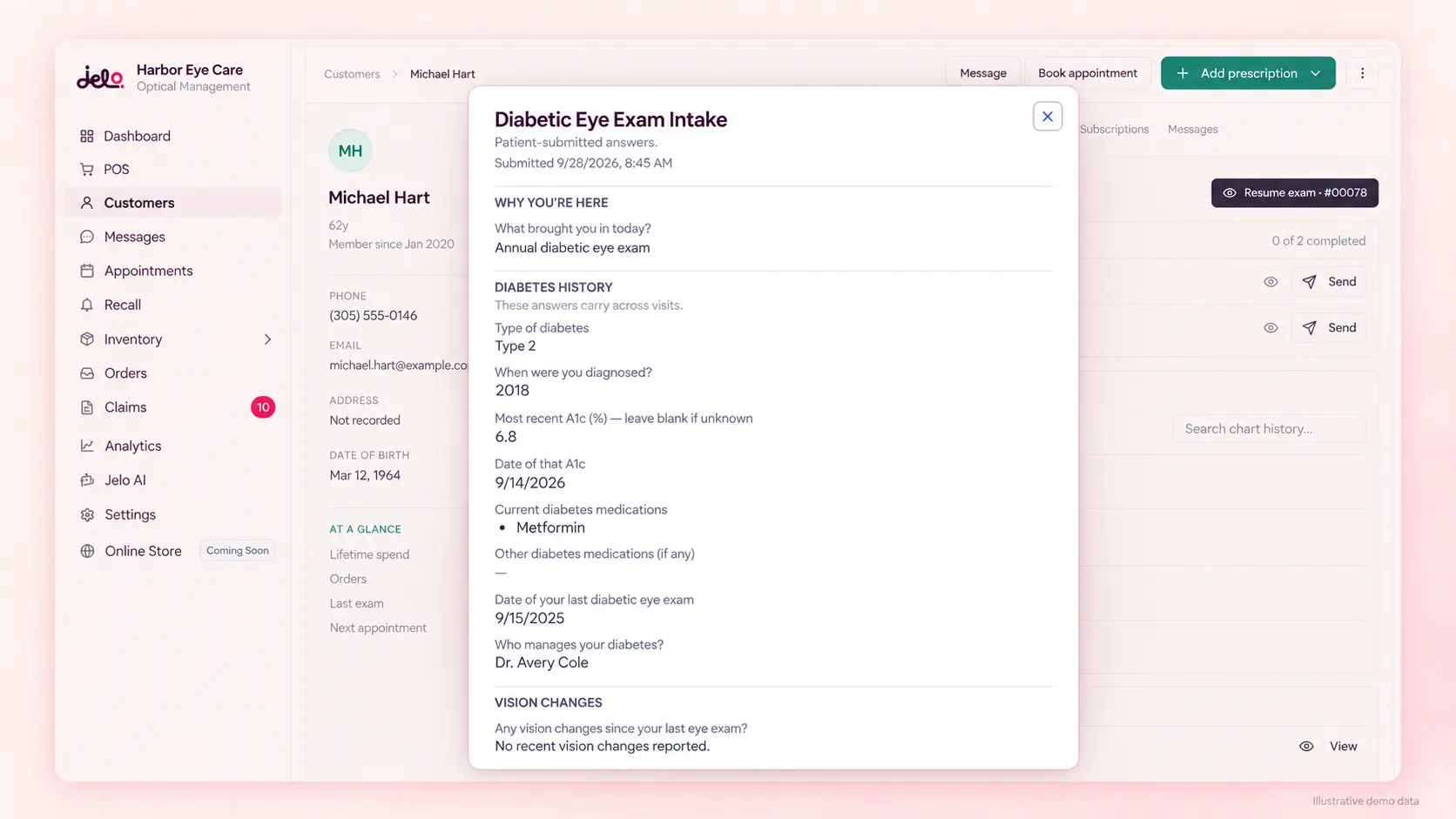
Jelo’s intake types include general, return visit, diabetic eye exam, contact lens, glaucoma and OSDI dry-eye intake. These names describe available workflow categories. Selecting a form does not establish a diagnosis, determine clinical necessity or decide which examination a patient should receive. The clinical team remains responsible for choosing and interpreting the information needed for the encounter.
During setup, review how your practice intends to use each relevant form. Identify the staff member who selects or supplies the appropriate intake and how the team handles a changed visit context. A returning patient may need updated information, while a particular appointment may require a different review. Work through your actual intended cases with the implementation team instead of assuming that every patient follows one identical sequence.
Document the customization scope separately for each form you plan to use. General-intake configuration is the supported builder described here; other forms may have different constraints. Ask for a demonstration of the exact change you require. This prevents a common evaluation mistake in which a flexible example from one form is treated as evidence that all forms can be modified in the same way.
Design the mobile experience as part of intake
Many patients will approach an intake link on a small screen. Staff should therefore review the patient-facing experience on a phone before making it part of the standard process. Check whether instructions remain readable, whether the form’s sequence is understandable and whether the patient can recognize what remains to be completed. This is a practical usability check, not a claim that every patient will use the same device or browser.
Use fictional information and test the situations your team expects to support. A patient may need to stop and ask a question, may not have all details available or may need assistance entering information. Decide how your office will help in each situation. Do not promise save-and-resume, translation or accessibility features that have not been demonstrated for the actual form and configuration.
The front desk should also know what to say when someone reports a problem. A useful first question identifies the step at which the patient became stuck without asking them to send sensitive information through an inappropriate channel. Staff can then route the issue through the approved support process. Clear assistance instructions often matter as much as the arrangement of fields on the screen.
Find the submitted intake before the patient reaches the next step
An intake is operationally useful when the appropriate person can locate it at the right time. In a demonstration, follow the submitted sample from the patient-facing form into the patient record. Ask the front-desk user to find it, explain its status and identify which information needs review. Then ask the clinical user to locate the same information in the context of the visit.
Include a second fictional patient with a similar name. This is a navigation and identity-check exercise, not a test involving actual patient data. The team should be able to explain how it knows it is looking at the correct person and current visit. A fast click sequence is not a useful success measure if staff cannot describe the context of the record they opened.
Record the handoff in your procedure. Specify who checks intake readiness before arrival, who helps with incomplete information and who reviews clinical responses. If the process includes a manual step, name it openly. That makes the workflow teachable and gives you a useful starting point when investigating why a patient reached the next stage without the expected information.
Keep acknowledgments and consent tracking understandable
Care Optica’s experience illustrates why tracking records can matter as much as collecting them. The single-location practice previously used paper charting and had difficulty finding charts and tracking HIPAA acknowledgments and consent to treatment. In the context supplied by Jelo, those records are now tracked automatically in the system. The practice reported improved efficiency, without supplying a measured percentage or a numerical time study.
Use that experience to identify your own tracking questions. Which acknowledgment or consent document is relevant to the visit? How does staff know whether it is present? Who resolves an incomplete or unclear record? Have the team demonstrate the relevant workflow rather than assuming that the word “digital” answers those questions. The content and use of your practice’s forms should be reviewed by the appropriate responsible people.
Keep collection status separate from legal interpretation. A software record that a form was completed is not, by itself, an assessment that the practice’s document or process satisfies every applicable requirement. This guide describes organization and review. For Jelo’s confirmed security and agreement commitments, see the security page; for the customer’s own account, see the Care Optica story.
Change forms without losing the meaning of earlier answers
Form changes need a small amount of governance. Decide who can propose a change, who approves it and who checks the result. Jelo’s general-intake configuration applies to subsequent intake use, while existing submitted intakes retain their recorded responses. Staff should understand that an earlier submission reflects the form completed at that time, rather than assuming every historical response now belongs to a newly configured question.
When changing a question, record the reason in your practice’s approved workspace. A useful note describes the problem, the intended correction and the date the team began using it. Test the revised form with fictional answers, including any required or optional behavior that changed. Tell affected staff what is different so they can recognize the new wording when reviewing submissions or helping a patient.
Avoid making several unrelated changes just before a busy operating day if the team has not reviewed them. The point is not to impose a universal release schedule; each practice chooses its process. The point is to make a form change observable and understandable. When a staff member asks why an answer looks different, someone should be able to explain the configuration that produced it.
Prepare exceptions instead of hiding them
A dependable intake process includes a plan for ordinary exceptions. Examples include an incomplete form, conflicting contact information, a patient who needs assistance and an answer that requires clinical clarification. These are scenarios to rehearse with your team. They are not statements that Jelo automatically detects or resolves every possible inconsistency in a patient’s responses.
For each exception, identify the next action and its owner. The front desk may need to contact the patient, the clinician may need to review an answer or the manager may need to correct a configuration issue. Keep the description specific enough that another employee can continue the work. “Intake problem” is less useful than a note identifying the unresolved step and the responsible role in the approved patient workflow.
Review exceptions periodically to find repeated causes. If patients frequently misunderstand the same question, the issue may be wording. If staff cannot find completed forms, the issue may be navigation or training. If an outside dependency is involved, adding more form fields may make the experience worse. Diagnose the cause before selecting a change.
Measure completion without overstating the result
Choose what you want to measure before counting forms. One possible operational measure is the number of eligible visits with intake completed by a defined checkpoint divided by the number of visits eligible for that intake. The practice must define the checkpoint and exclusions consistently. This guide does not prescribe an industry target or claim that every appointment requires the same intake.
Consider a fictional cohort of twenty eligible visits, with sixteen completed intakes at the agreed checkpoint. The completion rate is 16 divided by 20, or 80%. That result says something about the defined process. It does not establish that every answer was clinically reviewed, that documentation was accurate or that the practice met a compliance requirement. Keep those separate questions separate in the measurement record.
Use the operations worksheet for aggregate counts and write the definitions alongside the result. Repeat the same measurement after a change, while noting differences in staffing, volume or visit mix. A small improvement may be worth investigating, but it should not automatically be attributed to software. The most useful next step is often to review the unresolved examples and identify what prevented completion.
Connect intake with the rest of the practice
Intake sits between scheduling and clinical review, but its effects can reach the optical and billing teams as well. The practice should decide which information each role needs and how staff will recognize that the relevant review has taken place. Keep the clinical meaning of the information with the appropriate professionals. A form response should not silently become a diagnosis, an order specification or a billing decision.
A complete rehearsal follows one fictional visit through the connected workflow. Begin with the appointment, complete the selected intake, review the patient record and continue to the next relevant stage. Ask the receiving person what they need to know before proceeding. This exercise reveals whether an important handoff depends on an informal conversation that has not been included in training.
Jelo’s platform subscription is $300 per month per location or $3,000 per year per location, with unlimited doctors and staff at each paid location. Intake is evaluated as part of that connected platform. Payment processing and insurance services have separate rates. Review the complete commercial scope on the pricing page and use the demonstration to test the intake process your own team will operate.
What to bring to an intake demonstration
Bring a blank version of your current or proposed form, a list of the fields your team relies on and the staff roles responsible for reviewing them. Use fictional answers when demonstrating the workflow. Identify the changes you consider essential, such as making a supported question optional or adjusting its order, and ask to see those exact changes in the general-intake builder.
Include the patient-facing experience and the staff-facing review in the same session. Joel or Loreli leads Jelo demos, and the agenda can focus on the steps that matter to your practice. Ask the presenter to show where the sample submission is found, how the relevant role accesses it and what the team should do when information remains incomplete. Record any unanswered requirement instead of treating a related example as proof.
After the demo, use a short acceptance checklist: correct form selected, understandable instructions, intended required fields, successful fictional submission, correct patient association and a clear reviewer. Add the handling of at least one exception. This gives the practice a practical way to decide whether the intake workflow is ready and a repeatable exercise for training the next person who joins the team.